
Features
What SolidSeas reads, shows and writes today. Features marked Experimental work but are not finished, and may change between versions.
A folder viewer for CAD files
Open a folder and SolidSeas Viewer lists every part, assembly and drawing in it, with the other 3D files beside them.
- Details or icons, with each file's stored thumbnail, or one drawn from its geometry.
- A folder tree, a name filter, and a row of toggle buttons to show one file type or several.
- Opening a folder again is instant: the listing and thumbnails are kept in your cache folder.
- Open a file in its own program or show it in File Explorer, straight from the list.
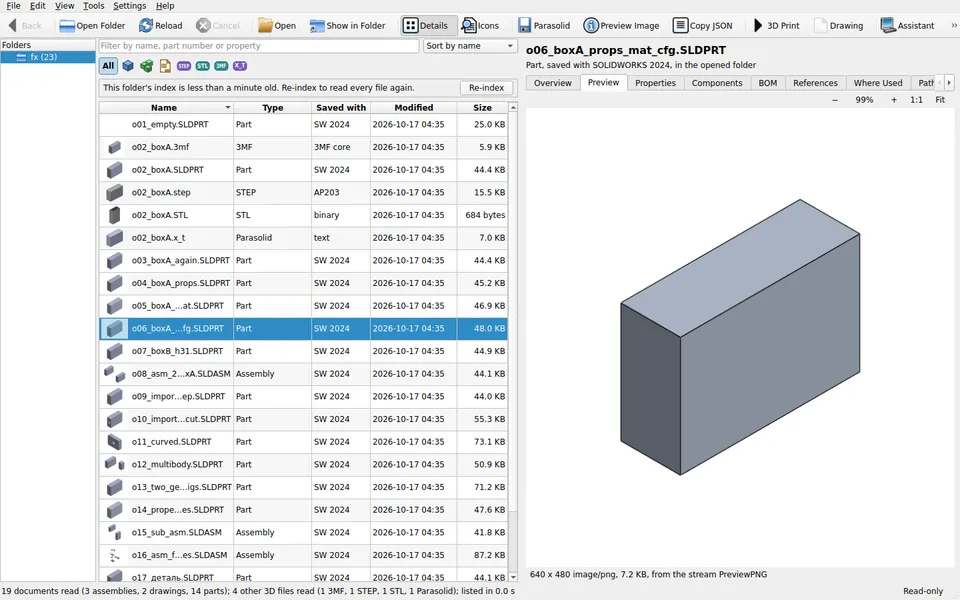
Properties, configurations and components
Select a document to see what is inside it, without SOLIDWORKS.
- Custom and configuration properties, with their types and expressions.
- Configurations, material and the SOLIDWORKS version the file was saved with.
- An assembly's component tree with each instance's configuration, state and position.
- Double-click a component to open its file, then Back to return where you were.
- References: where each file the document refers to is now, even if it moved.
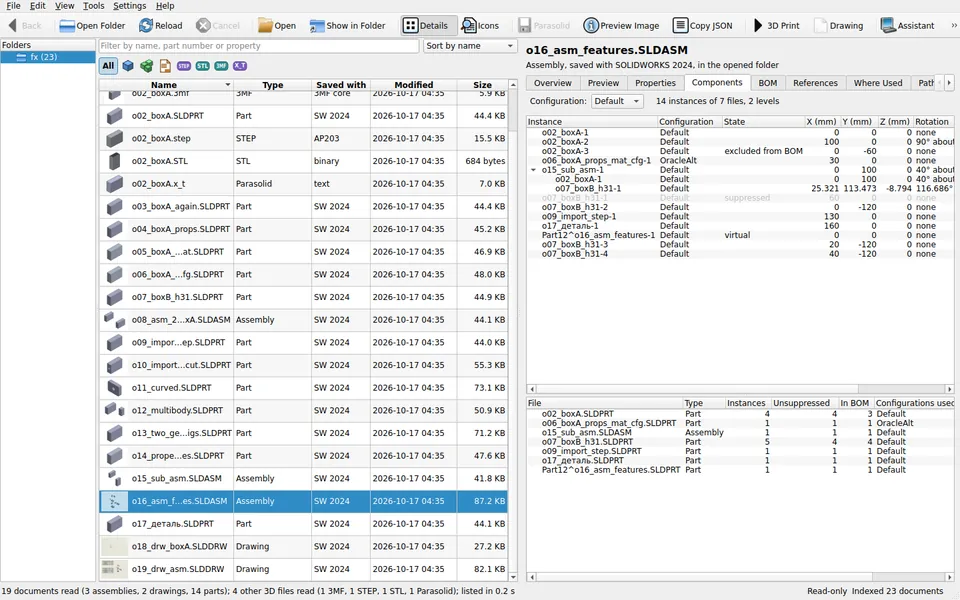
Bills of materials and where used
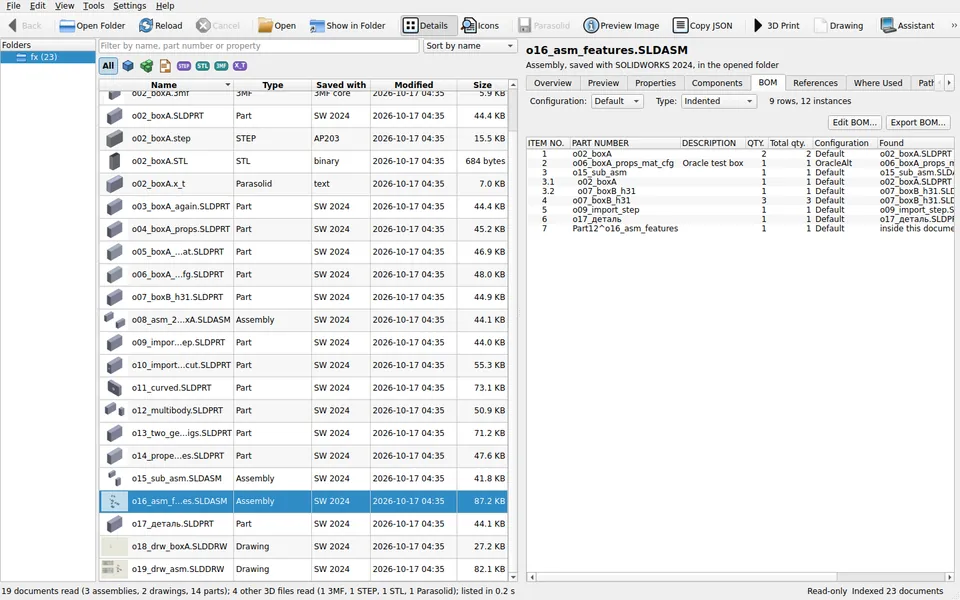
An assembly's BOM tab draws its bill of materials the way a SOLIDWORKS BOM table does: top-level only, parts only, or indented.
- Item number, part number, description and quantity, with the total in the whole assembly.
- Export the BOM shown as CSV (UTF-8, for Excel and ERP imports) or JSON.
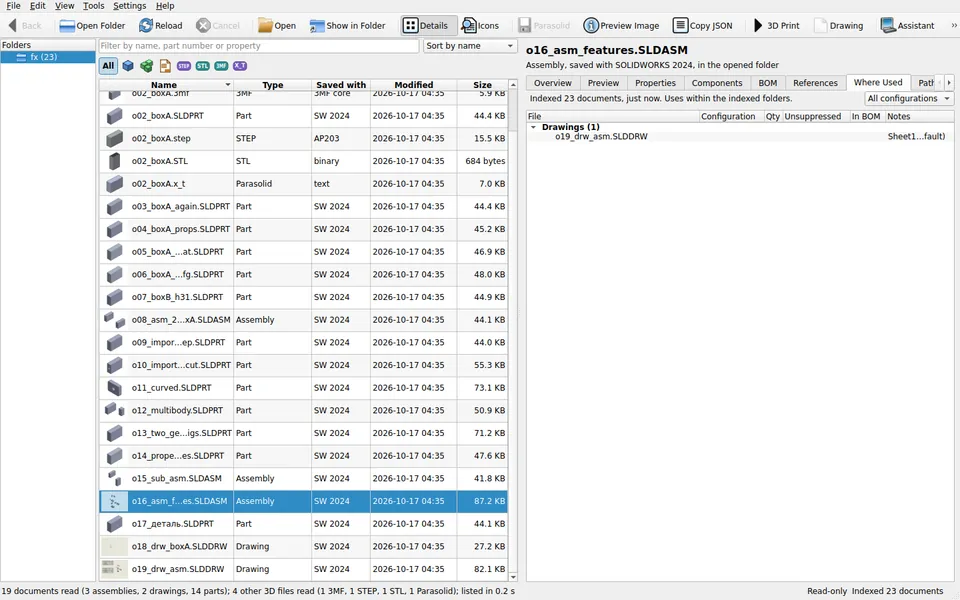
- Where Used lists the assemblies and drawings that use a part, directly or through a sub-assembly.
- Once a folder is indexed, the filter finds documents by part number, description or property.
3D view, STEP, STL, 3MF and 3D Print
Switch on the interactive 3D view in Settings to turn, pan and zoom parts and assemblies, with a view cube, exploded views, and hide, isolate and transparency for each component.
- Export STEP writes a part or assembly as STEP AP214 with its exact faces and edges, not triangles, and says when it had to approximate.
- Export for 3D Printing writes STL or 3MF into a folder you choose.
- 3D Print exports and opens the file in your slicer: Bambu Studio, OrcaSlicer, PrusaSlicer, UltiMaker Cura, or any program you pick.
- Parasolid and preview image exports too. An export never replaces a file of yours.
Drawings from 3D parts
File > New Drawing makes a drawing of a part: its views, dimensions, hole callouts, notes and title block, saved as a SolidSeas drawing file with a PDF and a DXF. Edit it, have it signed, release it, and update it when the part changes.
Drawings are experimental. Check every drawing before you use it: until a drawing is released, its PDF and DXF carry a PRELIMINARY stamp. You can turn drawings off in Settings.
What a drawing holds
- Views and sheet chosen in a wizard, previewed as you go
- Datum-referenced dimensions and hole callouts
- For an assembly: views, a parts list and item balloons
- Sign, release and revise, with released files kept
A library, a command line and a REST service
The same reader the viewer uses is a Python library for ERP, invoicing and project-tracking systems. It needs no SOLIDWORKS installation and runs on Linux and Windows.
- The
solidseascommand prints JSON with--jsonand has documented exit codes. solidseas serveanswers on 127.0.0.1 only, with a bearer token in a file only your account can read.- The full reference, with recipes in Python, curl and TypeScript, is in docs/API.md.
from solidseas import open_document, scan

with open_document("D:/Jobs/Example/frame.SLDASM") as doc:
    print(doc.doc_type, doc.active_configuration, doc.property_values())
    tree = doc.components()                  # the assembly's component tree
    bom = doc.bom(bom_type="indented")       # its bill of materials
    image = doc.preview()                    # the stored thumbnail, or None

listing = scan("D:/Jobs/Example", include=("properties", "preview")).listing()solidseas list D:\Jobs\Example --include properties --json
solidseas bom D:\Jobs\Example\frame.SLDASM --type indented --format csv -o D:\Exports\frame.csv
solidseas export D:\Jobs\Example\bracket.SLDPRT --format step -o D:\Out\bracket.step
solidseas index D:\Jobs\Example
solidseas where-used D:\Jobs\Example\parts\bracket.SLDPRT
solidseas serve --root jobs=D:\JobsThe modeling assistant and MCP
The modeling assistant works alongside your own SOLIDWORKS installation. Describe a change, and the AI provider you set up (Anthropic, OpenAI, Gemini, or Ollama on your own server) drafts code for you to read. Nothing runs until you press Run.
SolidSeas is also an MCP server, so a chat in Claude Desktop or Claude Code can use it. It listens on no port: the chat program starts it and talks to it directly.
What the AI sees
- The part is described by numbers and handles only
- File names, paths and property values never leave your computer
- Your API key is kept in Windows Credential Manager
- A monthly budget caps what the assistant may spend
Extensions
Extensions keep the viewer small: each one is off until you switch it on under Tools > Extensions, and the larger ones come as a separate download you add only if you want them.
Gridfinity bins
Photograph your tools on a sheet of paper, and a chat makes a Gridfinity bin with a pocket shaped to each one, ready to print. Uses Tracefinity, running on your PC or your own server.
CAD Bridge
Lets the assistant and the chat work in the parts open in your own SOLIDWORKS 2024 or later, on this PC only.
Video export
Adds Save Animation to the 3D view, so an assembly's explode and collapse can be kept as a video.
Formats SolidSeas reads
Every format below is listed and previewed in the viewer, and exports to STL and 3MF.
| Format | Files |
|---|---|
| SOLIDWORKS | .sldprt, .sldasm, .slddrw |
| STEP AP203, AP214, AP242 | .step, .stp, .p21 |
| Parasolid | .x_t, .x_b, .xmt_txt, .xmt_bin |
| Alibre Design | .AD_PRT, .AD_ASM |
| ACIS | .sab |
| 3MF | .3mf |
| STL | .stl |
| OBJ | .obj |
| PLY and OFF | .ply, .off |
| glTF | .gltf, .glb |
| AMF | .amf |
IGES, Inventor, Solid Edge, Fusion, 3D XML, eDrawings and VRML files are recognised and listed, but not read yet.